Showing posts with label Android Apps. Show all posts

Thursday, 4 September 2014

Why Do Android Apps Want So Much Access to My Data?


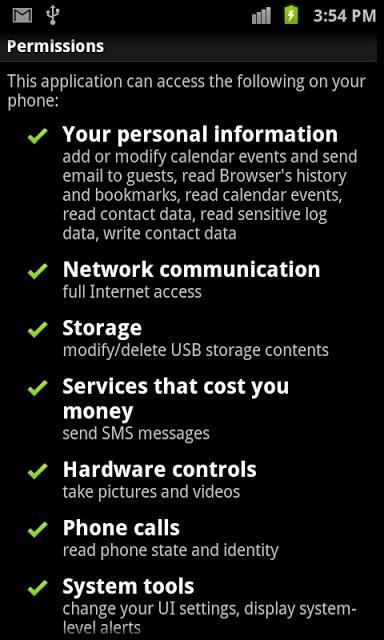
Every time you install an Android app, you’re asked to OK the app’s access to certain parts of your phone. You might see this, for example:
Why Do Android Apps Want So Much Access to My Data?
This week, reader Maureen noted that these apps seemed to be overreaching just a tad. Why, for example, would The Weather Channel app need access to your Device and Call information? Why would it need to know if WiFi is enabled and the names of all nearby WiFi devices?
You may recall that Facebook encountered a bit of public pushback on this same issue when it released its Messenger app a few weeks ago. To install it, you had to give it permission to access your entire address book, send text messages, record videos using your camera, know your location at all times, and access the Internet when it wants. Everybody accused Facebook of getting greedy with its data harvesting.
As it turns out, all apps seem to ask for a lot of permissions, and most of it sounds a lot scarier than it is. If you’re an app developer for Android, Google says you must declare what parts of your phone your app can use — and you must use Google’s wording.
So Facebook had to use text that says, “Has access to your phone,” even though what it really means is “…if you try to call someone from within the Messenger app.” It had to use text that says, “Can access your camera,” when what it really meant was “…when you take a photo to send to a friend.”
I wrote to The Weather Channel to ask about its permissions, and a spokesperson told me the same kinds of things: Why does it need access to your phone? So that the app can make severe weather alerts pop onto the screen. Why does it need to know about nearby WiFi networks? Because Android phones use WiFi to help them figure out where you are — and The Weather Channel app needs to know where you are so it can give you local weather forecasts.
Google recently updated the way it displays permissions, making them cleaner and a little less scary. But if you ask me, the iPhone’s method is better yet. It asks you for access to some part of your phone only at the moment when it needs access.
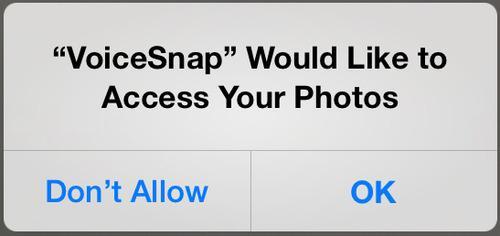
iPhone permissions pop-up
In any case, it’s ironic that Google runs into public-perception problems with these permissions screens, because the whole idea was to shine as a beacon of transparency and openness — not to scare people with overly broad wording.

Sunday, 31 August 2014

How to Find the Best Deals on Android Apps


Appsales_android_ndtv.jpg
In an earlier article, we described how you can track great deals on great iOS apps, but that information is of little use if you're an Android user. If you find yourself scouring dark corners of Google Play store in the hope of landing yourself a good deal, worry not, help is at hand. Android may not necessarily have the best paid apps, but it definitely has the best app for finding deals on paid apps. Read on.
AppSales
AppSales is our favourite discount tracking app, and it's only for Android. It comes with several advanced filtering options to narrow down your search. With this app, you can filter search results by the amount of discount being applied, or show only apps that have gone free, which had a minimum rating you set. Here's how to use it:
1. Install AppSales and run it. You'll see two tabs - Sales and Watchlist. The first tab shows all apps on sale and you can tap any of these and click the eye icon to add it to your watch list to track deals at a glance.
2. To filter your deal hunt, tap the three vertical dots icon on the top-right > Settings. The first option is Set filters. Select the minimum discount and rating here to narrow down on the best apps. You can also select app categories and configure notifications in the Settings menu.
One problem with the app is that you can only add 10 apps to your watch list for free. The app charges a subscription fee of around Rs. 250 per year to let you add up to 100 apps in this list.
You can also find the deals using the AppSales website. It doesn't have the same search tools, but it's a quick way to find deals.
Amazon Appstore for Android
The other option for Android (and BB10) users is to install the Amazon Appstore. The Amazon Appstore has daily freebies, and it usually keeps offering up really nice apps; there are also huge discounts from time to time. Recently Amazon gave away paid apps worth $100 for free - so installing this on your phone is definitely a good idea.
IFTTT
IFTTT, short for If This Then That, is a great service that lets you automate several tasks. You can make it do several things, such as send you alerts when the currency exchange rate crosses a threshold, for you. It has a channel called AppZapp, which lets you track app deals for top-rated apps. The process of setting it up for Android is similar to what we'd explained for iOS earlier.
1. Go to IFTTT > Create a Recipe.
2. You'll see this in huge font size: "if this then that". Click "this" > select AppZapp > scroll to the bottom > select one of six triggers.
3. Triggers are events that tell IFTTT to send you an alert. In the case of AppZapp, the triggers you can choose from are when a top-rated app goes on sale, goes free or gets an update. These three triggers are available for Apple's App Store and Google Play store. Pick the trigger you want to get relevant alerts, such as top app gone free.
4. Now choose your country (you can choose between US, UK or Germany, but no India) and category of apps you want an alert for. Now click Create Recipe.
5. The next step will show you the same text you saw in step 2. Instead of "this", you'll see the AppZapp icon. Now click on "that". This is where you select the kind of alerts you want. We recommend that you pick one of Email Digest and Android notifications. This will send you one email every day or a quick notification on your smartphone. You need to install the IFTTT app on your phone to get this to work.
We found this to be the best method to keep an eye on apps on sale or apps that go free due to the notifications. You can tap these notifications, tap the alert in the IFTTT app and you will be redirected to Google Play.
IFTTT_appzapp.jpg
Now that we've covered how to find the best deals on Android and iOS apps, we are certain that Windows Phone, BlackBerry, PC and Mac users are feeling left out. There's no need to be sad as we will help you save money on those platforms in an upcoming article.

Saturday, 23 August 2014

Most smartphone users download this many apps per month: zero


In summer of 2008, Apple introduced another game-changer that would affect the way people used smartphones moving forward – the iPhone App Store. This has now contributed to the global consciousness about apps, and Google saw that this was the only way to go to peddle its apps as well through the Android Market, concluding in the current incarnation of the Google Play Store. But why does comScore’s new data point to a staggering truth – that most smartphone users average ZERO app downloads in a month?
According to the same study, 52 percent – a little over half the time people spend on digital media (Internet, smartphones, tablets) are on apps. Yet the numbers of the report say this – that 65.5% of all smartphone users in the country average zero app downloads in a month. Only one third – roughly 30% -- download any apps at all, and that would be around 1 to 3 apps.
us-smartphone-users-number-of-app-downloads-per-month-of-smartphone-users_chartbuilder
What’s the deal? It’s not like these apps aren’t useful – the usage numbers say that more than half of US smartphone owners tapped and used apps on a daily basis (comScore). Are good apps too pricey? We all know that most apps are free, and even then, most paid apps average on from a few cents to a few dollars, and the market is such that it pushes prices down rather than up.
One suitable explanation maybe that over the years, the app saturation has gone on to very high levels that it pushes users to have an “app routine” – that is, get to know the apps that do the job for you, and stick to them like glue. Once a user falls into a routine, they will still have the same apps even if they upgrade devices – the Google Play Store has made this tremendously easy, and even I can say that I am glad for it.
apps2
Another explanation may be that the Apple App Store and the Google Play Store – but more Apple than Google, really – has made it very difficult to discover new apps. The Apple App Store ecosystem is notorious for relying heavily on “top lists” and also known for not improving its search functions over the years. This only makes “editor’s picks” and bigger companies get all the profit and pushes an app – however ingenious it is – to the bottom.
The numbers won’t lie, the app ecosystem has pushed people to a state of non-discovery. It falls a lot to Android journalists and writers to discover and recommend the cool apps that need to be unearthed out the pile. But it also points to Apple and Google having to improve their market ecosystems, or else it might die a slow and painful death.

Wednesday, 20 August 2014

Pushbullet Update Introduces Universal Copy and Paste Across Devices


pushbullet logo

Pushbullet, an app that continues to impress us with each new update, is back again with something that may blow your mind a little. The Pushbullet team is calling it “universal copy and paste,” because, through Pushbullet, you can now copy something on one device and then paste it through another, instantly.

To see universal copy and paste in action, be sure to watch the quick clip below. To try and explain it, though, think about a time where you are sitting at your computer and you find something on the web that you would like to share through an app on your phone that may not have a web or desktop experience. A quick copy of a URL on your desktop, for example, would then be available in your clipboard on a mobile device for sharing via app. It’s sort of like magic.

This new universal copy and paste requires the Pushbullet app for Android and the Pushbullet Windows desktop app (download). As of now, the Pushbullet team is working on Mac support. This new feature, however, does not work through the browser extensions.

Play Link


Humble Bundle SEGA Edition Should Fulfill Your Sonic the Hedgehog Cravings


Humble Bundle

A new Humble Bundle is available for lovers of SEGA titles, specifically titles which involve Sonic the Hedgehog. Today, people feeling charitable can pick up Sonic 4 Episode I, ChuChu Rocket, and Virtua Tennis Challenge for whatever price they would like, but if you pay over the average of $3.70, you can also get Sonic & SEGA All-Stars Racing, Sonic 4 Episode II, Crazy Taxi, and more to follow soon.

With Humble Bundles, you choose your price for the games, then determine where you would like the money to go. You can split it evenly between developers or can choose to give all proceeds to a predetermined charity. This Humble Bundle is directly involved in aiding the Child’s Play Charity, WaterAid, and UNICEF.

After a few days, Humble Bundle always adds in more games, so for a very low price, mobile gamers can grab a ton of great SEGA titles, so this bundle is not one to pass up. Plus, it’s for a good cause!

Go grab it.

Humble Bundle Link


Uber Releases API, Allows Partners Like United or OpenTable to Access Uber Info


uber api android

Uber, the insanely popular ride requesting service that my hometown of Portland hates (personal problem), released an API this morning that allows partners to build-in Uber support to their apps and services. Through this API, apps can now “pass a destination address to the Uber app, display pickup times, provide fare estimates, access trip history and more.”

What does that mean? Well, it could be that you book a car to pick you up just after you book your restaurant reservation for tonight. Or maybe you need a ride to and from the airport, which you could book through you favorite airline’s app?

As of today, Uber has already partnered with 11 companies, including Expensify, Hinge, Hyatt, Momento, OpenTable, Starbucks, Tempo Smart Calendar, Time Out, TripAdvisoer, TripCase, and United Airlines.

Here are some other examples of how this new integration could work:

  • Dinner date? Request an Uber to your favorite restaurant right from the OpenTable app. Your driver will arrive already knowing where you are headed.
  • Catching a flight? The United mobile app shows ETAs of the closest drivers and fare estimates, so you can get reliable ride to and from the airport for less.
  • Night out? Time Out shows different Uber options—from low-cost to luxury—so you can be sure to arrive in style to the city’s best nightlife.
  • Need a place to stay? Book a room through the Hyatt Hotels & Resorts app and request a ride to your hotel right from the reservation screen.
  • Want a recap of your journey? Use Momento to view a timeline of your Uber trip history alongside other moments in your life.
  • At some point down the road, they may give apps the power to request rides, but for now, they want to keep that kind of power to a small group of partners.

To celebrate the launch of this API, Uber and many of its partners are offering $30 off first rides.

Friday, 15 August 2014

20 best Android apps and games this week


Rove for Android.

It’s time for our weekly roundup of the best new Android apps and games to have emerged on the Google Play store.
As ever, prices are correct at the time of writing, but may have changed by the time you read this. (Free + IAP) means in-app purchases are used within the app.

APPS

Rove (Free)
Rove is pitched as an “automated journal” that tracks your daily movements, then adds in your photos for a record of what you’ve been up to. Well, at least the parts you’ve photographed. Its developer promises it’s “100% private” but as a free app, you might wonder how it’ll make money in a way that doesn’t clash with that ethos.
Fantasy Soccer (Free)
Or “football” as we Brits like to chippily call it. Yahoo’s new app is a fantasy football game that breaks the mould by looking beyond the (English) Premier League: the top divisions from Spain, Italy, Germany and France are also included. It ties in to Yahoo’s web-based fantasy competition.
Unclouded (Free + IAP)
If you use Google Drive and/or Dropbox for cloud storage, Unclouded might be a really useful app to have installed on your phone. You can browse either service to see which folders and file types are hoovering up your storage space, then (if you upgrade to the premium version) clean them up.
Over (£0.59 + IAP)
There are plenty of rubbish apps out there for adding text to your photos before sharing them on social networks. Over is one of the few good ones: created with an eye for design, its fonts are attractive, and its user interface gives you lots of control over your final image.
Peppa Pig Theme Park (£3.99)
Peppa Pig remains hugely popular among children, as you’ll know if you’ve trailed round her theme park (and its shop) with a hyperventilating toddler. This is her latest app for Android: a collection of 10 mini-games and creative activities for young fans, with – shock! – a theme park theme.
The Art of Thinking Clearly (£1.49)
In its book form, The Art of Thinking Clearly has sold more than a million copies. Now it’s an app, promising no-nonsense advice on your real-life decisions, from money and work to people. You answer questions to uncover “cognitive biases” that may lead you down the wrong path.
Zoe (Free)
Zoe is the work of handset maker HTC, although it’s not restricted to its own Android devices. It’s yet another app for adding filters to photos and videos, then sharing them to social networks. Its features look good, but with the likes of Instagram out there, it may face a challenge catching on.
Shoot in the 70’s (Free + IAP)
Very much an app for football fans in their 50s, reproducing as it does issues of Shoot magazine from the 1970s. That said, there’s plenty of interest for younger fans with an interest in football history too – or in the history of footballer haircuts, which is frequently a hoot.
Snap Clap (Free)
Finally, a one-shot (literally) app that takes a photo when you clap your hands. The idea being that you can use it instead of a timer to take shots where you’re in the picture too – group photos, for example. A novelty, but perhaps useful too.
Surgeon Simulator for Android.

GAMES

Surgeon Simulator (£3.99)
Bossa Studios had a big hit with its blood-spattered medical sim on other platforms, but now it’s on Android – and as messy as ever. Your job is to operate on “the world’s unluckiest patient” transplanting teeth, eyes and double-kidneys while trying not to kill him off on the operating table.
Crazy Taxi City Rush (Free + IAP)
Some players are reporting crashes (not the on-road kind) while others are grumbling about the free-to-play aspects of Sega’s reboot of its Crazy Taxi game. But I’ve found it pretty fun: you barrel around town picking up and dropping off fares. Veterans of the Dreamcast edition may be turned off, but it could pick up newer players.
Dragon Quest IV (£10.49)
Talking of old console games, here’s publisher Square Enix with its latest retro reboot: roleplaying game Dragon Quest IV. If you harbour fond memories of the original game, you’ll love wallowing in nostalgia: it’s a faithful port. Its high price (for mobile games) may put off newer adventurers, though.
Dungeon Defenders Eternity (£5.85)
The original Dungeon Defenders game was great on iOS: a combination of tower defence fending off hordes attacking your dungeon, and action-RPG as you waded in to join the battle. This is the “definitive version” with more missions and gameplay improvements, complete with a four-player online co-op mode.
Manuganu 2 (Free + IAP)
The first Manuganu game was a treat on Android, with its mixture of endless-running and traditional platform gaming. Now it’s got a sequel, with its hero now able to fly and swim. The presentation looks as impressive as the first game, with 40 levels and four bosses to work your way past.
Ride ‘Em Rigby - Regular Show (£0.59)
My children can’t get enough of Regular Show on TV, so I suspect its spin-off game will find a fair few fans young and old. It’s a not-quite endless (there are 20 levels) racing game that sees hero Rigby hanging on to a rampaging Muscle Man in the local park, picking up power-ups to stay attached. Great fun.
Unpossible (£1.17)
Already a critically-acclaimed hit on iOS, Unpossible looks just as good on Android. It sees you dodging your way through neon-splashed levels, tilting or touching according to your preferred controls. Survive long enough, and you unlock new levels, but be warned, it’s very tough.
Ice Age Adventures (Free + IAP)
Be warned, parents, this game based on the Ice Age films has sky-high in-app purchase, so make sure your restrictions are turned on before letting a child play. It’s an adventure game starring Sid, Manny and Diego that wraps in Candy Crush-style match-three puzzles to unlock animals to use as power-ups.
Bik - A Space Adventure (£0.58)
Bik is the latest Android game inspired by the heyday of point’n’click adventures on PC, with charming pixelly visuals, an alien theme and plenty to see and do. If you grew up with the Monkey Island and King’s Quest games, it may bring the memories flooding back. 
Talisman (£4.79 + IAP)
The digital edition of the classic Games Workshop board game has been available on Android in “Prologue” form since last year, but now the full thing has been released. It sees you choosing a fantasy character then exploring a world – as represented in board-game form – slapping down monsters and levelling up as you go. Expansions will be sold as in-app purchases.
Sumico - The Numbers Game (Free + IAP)
Finally, something for anyone who’s been enjoying number-puzzle games like Threes! in recent months. Sumico gets you swiping on a board of numbers and mathematical symbols, clearing each level to progress to the next. A simple idea, but with truly brain-stretching gameplay once you get into it.
Those are our picks, but what have you been enjoying on Android this week? Post your recommendations (or feedback on these) in the comments section.

Wednesday, 6 August 2014

Micromanage Your Life With These Smart Reminder Apps


todo-app-inline

Given all the minuscule tasks I need to get done each day, things always fall through the cracks. It’s usually the smallest tasks I end up forgetting—errands, two-minute chores, personal hygiene stuff. Things that should be good habits, but aren’t. So I decided to put my phone to work, letting my mobile micromanage me into remembering to do all the little things.

Standard calendar and reminder apps, which are time-based and rely specifically on timed events like meetings or appointments, don’t suffice. What I need is something smarter than a calendar, something that will nag me during my downtime—gently of course.

The first app I tried is Timeful, a free download for iOS. It looks at your calendar, then helps you find time in your schedule for the less-critical items. Once you download the app, you give it access to your calendars, then select a few things you’d like to regularly be reminded to do, like buy stamps or floss your teeth. You choose how often you’d like to do these tasks—once a week, three times a week, once a day, whatever. You then choose a preferred time of day (morning, afternoon, or evening) for the app to squeeze it in. The app then looks for appropriate gaps in your calendar and slots your B-list to-dos into the blank spots in your schedule. When those times arrive, you get a push notification. You can also choose a specific time to be reminded, but I find Timeful’s automatic time-gap-finder actually ends up being more helpful.

The Timeful interface is crisp. At the bottom you can tap to create a new event, to-do, or regularly scheduled habit. You can also see a list of all of your to-dos and habits that you have yet to accomplish, or have already completed. In the app’s settings, you can set how often you’d like the app to remind you to do tasks, and you can input your normal sleep and work hours, so it knows to schedule things during your actual free time.

Some folks may prefer something a more structured like Due ($5, iOS), a super robust to-do app. Rather than putting in a title and then selecting a reminder time for a task, you can input an item like “Pick up the dry cleaning in two hours” and it can naturally parse that to remind you at the appropriate time. You can auto snooze reminders if you can’t deal with them at that moment, and the app will continue reminding you about them until you select that it’s been done, or rescheduled. It’s perfect if you really need to be nagged to finish a chore.

Due also has a handy reusable timer function. Whether you regularly need a timer for sets at the gym, or for cooking times for favorite dishes, you can save separate timers and use them over and over again.

Any.do (free for both iOS and Android) is a third option. The app has some clever interactions. You pull down at the top of the app to type or dictate a new task, then you swipe an item once it’s complete. Shake your phone to clear the item from your to-do list. Items are listed under Today, Tomorrow, Upcoming, and Someday headers, making it easy to glance and see what’s going on in the future.

With web apps on top of its mobile offerings, you can sync and be notified of reminders no matter what device you’re on. Any.do will remind you to do things based on your location—like if you need to make a phone call once you get into the office—and it can also regularly remind you of things daily, weekly, monthly, or yearly, on top of just at a preset time.

If you thrive on structure and organization, the Android app Tasks is a good option. After Yahoo shut down the Android app Astrid Tasks last August, this app, an Astrid clone, launched in its place. While Tasks lacks some of the features of the original (like integration with a web app and the ability to share or assign tasks), it still offers a straightforward platform for adding and prioritizing various tasks into different subject folders. You can set due dates and descriptions for an item, get reminders for when it’s due and when it’s past due, or set a timer for it. The app’s folder-based UI is particularly useful if you’ve been tasked with doing a bunch of little things for a particular event.

But there are a plethora of other time management and reminder apps out there, and what works for one person may not work for the next. Feel free to nag us about them in the comments.

Monday, 4 August 2014

The Best Android Apps of 2014


The Best Android Apps of 2014 are here: 


There is a lot of competition among the app developers to get listed in the top lists. The popularity of the apps and the number of downloads made every day plays a direct role in ascertaining the revenue one can make from the world of apps. Those who are wondering what the top apps in 2014 would be, can check out this list.

Start

We all want to have greater customization choices with our phone. Start is perhaps one of the most powerful apps for all those who want to reach out to their favorite apps even in the locked screen mode. This app is so designed that you can have up to 24 different apps of your choice in your lock screen itself. You can choose them manually or let the app configure it for you automatically.

It is available for free and can really offer a dynamic change in the way your phone looks, feels and operates.

Agent

Want to improve the performance of your phone? This app offers you 5 different agents that can make your phone a lot smarter than what it is. It comes with a battery agent which allows you to conserve your battery so that it will last longer. Further, there is a meeting agent that will turn your phone to silent, depending upon the calendar notes and reminders about the meetings you have set. There is also a sleeping agent that will deactivate a lot of features and put your phone to silent when you go off to sleep. These agents help in making your phone smarter.

Battery Defender

Most of us are tired of the quick battery drainage that happens very often. By using this free app, you can derive the maximum use out of your battery. This app disconnects the Wi-Fi and data connection when you are sleeping. You have the option of setting your sleeping time. It also changes your synchronization time to 15 minutes. This saves you significant battery storage.

Mumble

If you are tired of your phone vibrating at specific times and you want larger control over it, this app will turn out to be handy for you. Mumble is a revolutionary app because you can sense the length and content of the message even before reading it. You can ignore annoying messages and even fix typos.

Secret

Want an anonymous place for ranting and finding others who believe in the same things as you? This is the perfect app that allows you to share your thoughts and complain anonymously. You have the option of adding images, emoticons and graphics. You can blur captures and enliven the conversation too. Those who are looking for such an app will definitely love what this one has to offer.

These are the best apps of 2014 in the Google play store and there are many other choices to pick from too.

Thursday, 31 July 2014

Amazon is giving away over $100 worth of Android apps for free


amazon-appstore-android-free-sale

Amazon has just kicked off a 2-day Android App sale that includes 30 different apps for free. These “essential” apps cover a range of categories including games, utilities, travel, finance, fitness and more. This sale is a great way to pad your app library without spending a dime.

Before you get started, make sure you have the Amazon Appstore for Android installed on your smartphone or tablet.

Here’s our top picks:


SwiftKey updated with performance improvements and new themes


SwiftKey

SwiftKey received an update today that resolves some of the keyboard app’s recent performance issues. According to the software’s changelog, users should experience improved typing, loading times, translations, and several other bug fixes for glitches that caused force closes. In addition to some much needed technical improvements, SwiftKey announced the availability of five new themes: Spotlight Purple, Edge Green, Pulse Yellow, Pulse Pink and Hazy Pink.  If you’re interested in upgrading the look and feel of your keyboard, the outfit is holding a special summer sale that discounts prices on select themes by up to 33 percent.


Lastly, SwiftKey says it will be adding support for additional languages, including: Kyrgyz, Tajik and Turkmen, as well as adding emoji prediction for Arabic, Czech, Greek, Hebrew, Polish and Russian. If your phone’s stock keyboard isn’t cutting it, or you’re just looking for a new freebie app to test out, SwiftKey 5.0.2.4 is now available to download from Google Play.

Friday, 25 July 2014

Battle of the apps: Which Android browser is the best in the business?


Battle of the apps: Which Android browser is the best in the business? 

Believe it or not, but people are using their mobile browser less and less each passing year. One would think that the proliferation of internet and the Web would result in a spike, but that’s actually not the case, as more people are turning to specific apps for queries.

But a browser is still a key piece of the puzzle when it comes to any smartphone experience. We may not be using it as much, but we still do and there’s little worse than reading a website on a frustratingly slow or buggy browser. Thankfully, Android users have plenty of options when it comes to browsers, so they can keep rotating between them to try them all out. Besides the ability to select a different browser for new links through the native app picker menu means, you can simultaneously use many browsers.

We have been pecking at that app picker menu for over two months now, experimenting with a bunch of different browsers on Android. We decided to not use Google’s default Chrome or the older AOSP browser, but instead chose to focus on third-party offerings alone, since these are the real alternatives.

After the initial culling of the bad crop, we decided to focus on Opera, which recently saw a major update, long-time Android favourites Maxthon and Dolphin and the stable build of Mozilla Firefox. These we expected to enter the race without much trouble. But among the unknown lot, we went with Javelin which sports a very refreshing design and could turn heads as development continues. Then there’s Now Browser, the newest offering which claims to have Google’s new Material Design at heart.

We decided to ditch page loading times (since the difference is insignificant) and instead chose to test their features (and whether they are any good) in everyday conditions, fluctuating network reception, poor public Wi-Fi and what not. Is there a winner? There sure is. Let’s begin in no particular order.

Maxthon
Maxthon has been around for ages on Android and it’s one of the few browsers that’s available for damn near every platform – from Windows, Linux and Mac to Android, iOS and Windows Phone.

As a browser, it’s feature packed with cloud-syncing for sharing of tabs, files, links, etc to multiple devices. You can even sync favourites and bookmarks across devices. It works as advertised and our Windows bookmarks synced perfectly with our Android phone.

MaxthonUI_1
Tabs UI and a plethora of custom views

Users can set up gestures for quickly switching tabs and there’s a Reader mode for when all those ads and pictures get too distracting. In addition, Maxthon has a read-ahead mode where it can pre-load pages automatically. This is haphazard in practice, because it doesn’t always load the right page. I found myself using this less and less, so it’s really not that much of a time saver.

Another feature is gesture actions, which lets you open, close, switch and restore tabs by using simple directional gestures. It works, but it really depends on how quickly you can make these signs. After the first few times you get the hang of it, but it’s hit and miss till then.

Full-screen video player

Maxthon has also taken steps towards news discovery with something called NewsBites. With just a few news sites signed on, the collection is limited. We saw The Guardian, The Telegraph, BBC Sports and The Times London, so it looks like only some UK sites have tied up.

Maxthon’s UI is snappy; opening menus is smooth and there’s a full-screen mode to keep those nav buttons away. We especially like the night mode, which dims the display to keep your eyes from getting stung.

Overall, we were impressed with how fast the browser opened up; from a fresh installation, it took less than a second. Maxthon offers a bunch of features but we found ourselves craving a less bloated experience. The NewsBite feature is rather bland, gesture actions need some more polish, and the read-ahead mode is a bit hit-and-miss.
Rating: 3.5/5

Opera browser for Android

Opera brings a lot of the same features as Maxthon, but in a snappy interface and of course its biggest trump card is data compression in something called Off-Road Mode, since it uses cloud-based compression seen in Opera Mini, the lightweight alternative. This allows Opera to reduce the amount of data used by a site. In Off-Road Mode, images do take time to load, but if your objective is to just read, then Opera meets needs well.

Opera’s Speed Dial page also allows you to make folders, which is a great way to organise bookmarks of a similar nature and also helps in organisation for research and work, if at all you have moved to mobile at your workplace.

Opera lets you customise the UI for your device. This is the Tablet view with bigger tabs

For browsing of a casual nature, Opera offers something called Discover, which is essentially an aggregated news feed for various topics. It’s laid out in grid fashion and is pretty snappy, so this browser can be used as a Flipboard alternative too. With the latest version of Opera, you can use WebRTC standards to make browser to browser video calls, without installing a third-party app, which is a handy feature.

Off-Road mode saves data, Discovery page, Folders in Speed dial

Opera is fast, the interface is clean, uncluttered and less bulky than some of its rivals. The features are great too. Discover has plenty of options and you can even sort categories, while Off-Road Mode ended up saving me about 40 percent data in about a week’s use. Folders in Speed Dial are great too, if you are anything like me and have tons of bookmarks.
Rating: 4/5

Firefox for Android
Firefox is a name you can trust on any platform and on Android the reputation remains intact. With all the bells and whistles of the PC version, the Android app brings a Trojan horse in the form of Firefox OS apps.

Yes, you can download and use Firefox OS apps on your Android phone with Mozilla’s browser, but we wouldn’t advise it. They can be installed like regular Android apps and will be in your app drawer. But user experience is not even close to the native Android app experience. For example, the AirBnB app sports the new icon, but loads the older version of the website. The Etsy app on Android is a joy to use with big visuals and a clean interface, but install it using Firefox and you are just seeing the website packaged into an app.

Getting Firefox OS apps, browsing, and the add-ons store

You also get the usual add-ons, extensions and themes for Firefox on Android. Add-on selection is robust, but Dolphin has a better assortment of themes and uses them more prominently. Firefox’s theme application is not smooth either. Sometimes it takes about a couple of restarts before a theme gets applied.

With a Firefox account, you can sync all your open tabs across devices and this works well in practice. There’s little to no latency in how tabs appear, and you can even sync passwords, themes and add-ons if you choose. Though not all add-ons work as well as they do in the PC version.

Since I use Firefox as my primary browser, the syncing feature solved a lot of headaches, but there’s nothing compelling about Firefox on Android. It’s a me-too browser which is adding features that don’t really have much significance. It used to be good, now it’s just average.
Rating: 3.5/5

Javelin
Javelin looks unlike any other browser with its big typography-heavy UI. But it’s not just about its looks; Javelin brings a ton of useful features and is seriously a browser to watch out for.

After the on-boarding process, where the key features are displayed, you start off on a search page, which has a cool background. In all our time, the background wallpaper did not change, which would like to see changed. A rotating set of images would look amazing with Javelin’s ultra-clean UI.

Spirit Mode for VPN browsing; clean UI

All your settings are hidden in side navigation bar on the left, while the bookmarks are on the right. Up front you are only given the address bar, a refresh or stop button, and a shortcut to go into reader mode, which renders the page in a easy-to-read text-only format.

As for features, Javelin boasts a Spirit Mode, which is basically a VPN service, that circumvents internet blockades. The app lets you use Spirit Mode for 1 month without any charge, while it will be $1.99 per month after that period.

Javelin also has Stack, which is a cool way for you to open links while keeping your current task going. If you are in the Twitter app for example and see a link you want to read, you open it using Javelin and a small bubble pops up indicating the progress of the web page being loaded. You can continue using Twitter and even open subsequent links which will keep getting added to the Stack. Once clicked you can see the links in the order they were loaded, and can choose to open it in the full app or in windowed mode.

Using Javelin's Stack; you can open multiple links in this floating mode
Using Javelin’s Stack; you can open multiple links in this floating mode

Getting the Pro version (through in-app purchase) will let you open Stack links in reader mode, which will be significantly faster than the whole pages. One limitation is that the free version only lets you load 10 tabs at a time, which is enough for most users, but may not be for the most voracious Web consumer. The Pro version is available for $2.99, but you can choose to donate more to indie developer Steven Goh.

Javelin has the right idea. It gives users more than just an incognito mode for secure browsing and presents everything in a clean interface, that doesn’t need an action bar, but settings are still quickly accessible.

We found Stack to be a great help when using doing the morning catch-up routine on Twitter. Javelin has firmly got our attention and it’s poised to be the best Android browser in the future, if it continues the development pace. Since its early days, a lot of bugs have been ironed out, and if you have given up on it in the past, we urge you to take another look.
Rating: 4/5

Dolphin
This is perhaps the most feature-rich browser on Android and it has all the features that we saw in Maxthon and a bunch more just for fun. It’s also one browser that lets you change the entire look of the UI with themes, just like PC browsers.

Dolphin comes with a whole bunch of bookmarks right out of the APK. The pre-loaded bookmarks include most popular websites in each category. So you will find Facebook, Pinterest and the likes in social networking, and Flipkart, Amazon in shopping. (Disclosure: Dolphin pre-loads Tech2 as a bookmark).

Pre-loaded bookmarks and the Themes store; the entire UI gets the theme's colours
Pre-loaded bookmarks and the Themes store; the entire UI gets the theme’s colours

Dolphin also has add-ons like the big-boy PC browsers, and though the collection is limited you get most basic use case add-ons for reader mode, bookmarks widgets, screenshot taker, Tab reload (great for web browsing battery tests), translation tools etc. There’s something called Dolphin Float, which is a lightweight browser that lets you carry on with your app task, while the link loads in the background. This is great for Twitter clients which do not have an in-app browser.

The feature I like the most is Dolphin Sonar. It activates on shake or if you have a phone with on-screen buttons, it can even take the place of Google Now. Sonar is voice-based search and it’s freaking fast, and works brilliantly even for Indian names, although it may not always spell names the right way. In fact, add the right prefix and it will load you results directly from a website. In fact, it also returns back results for Google’s Knowledge Graph. “Watch ‘Double Rainbow’” for example took us to the YouTube search results page.

Add-ons and Dolphin's killer feature, the Sonar
Add-ons and Dolphin’s killer feature, the Sonar

Sonar was actually faster than Google Now in recognising my voice in most cases and mis-hears were few when I was not pronouncing a complicated Chinese electronics brand name. You can create an icon for your homescreen and use Sonar as your primary search service. It’s that good.

Dolphin features a full-screen immersive mode, as well as a night mode, though Maxthon beats it in the latter; Dolphin makes everything a bit too dark for my taste. This app too features a Javelin-like background browsing mode, which lets you load pages in the background, while you continue using the current app. It’s called Dolphin Float and is available as an add-on through the browser.

Even though I have a soft spot for Opera as it was the first mobile browser I ever used, I think Dolphin is the best third-party browser on Android. It may even rival Chrome, if it weren’t so ubiquitous and not pre-loaded by Google on all devices. Sonar, alone is a trump card, but Dolphin does other bits well too. I can’t recommend it enough.
Rating: 4.5/5

Now Browser
At 171KB, Now Browser is one of the lightest apps on Android, let alone a browser. And the size helps it deliver quick loading times. That’s even on low-end Android phones running Jelly Bean and with 512 MB of RAM. Pages load quickly with Now Browser, which claims to have been developed using Google’s Material Design guidelines. We didn’t see any obvious evidence of this on a KitKat phone, but the experience could be different on a Android L-running phone.

Landscape-tabbing
As simple as it gets

We really like the barebones approach of Now Browser, which also has a pro version that offers unlimited tabs (actually the upper limit is 100, while the free version only lets you load four tabs), cache trimming on exit, Web File compressor for data savings and the Now Browser rendering engine that claims to be ultra-fast when loading web pages. There’s also a Java Script acceleration mode for faster browsing.

Too many features buried in Pro version

We do wish that Now lets some of the Pro features creep in to the free version. At the moment, most of the bigger features are for the paid app, and the restrictions are a bit over the top (just four tabs, really?). Even so, if you are struggling with a slower Android phone, Now Browser is great.
Rating: 3/5